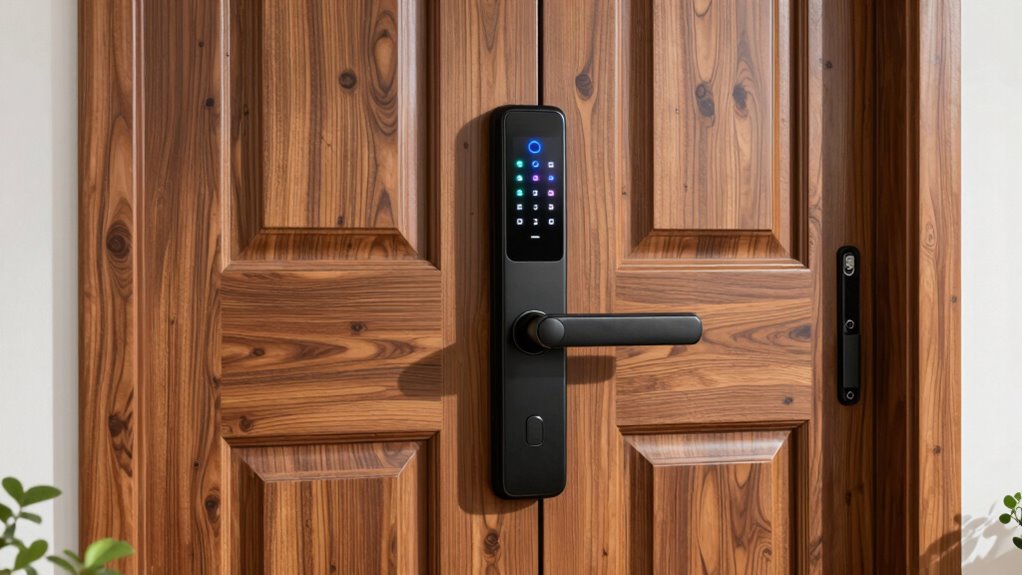

If you’re looking to upgrade your front door security, a smart lock offers convenience and control. The Kwikset SmartCode 260 stands out as the best overall for its reliability and ease of use, while the Wyze Auto-Lock Bolt v2 offers an affordable option with biometric access. The main tradeoffs involve balancing features like remote control, fingerprint access, and budget. More advanced models might add security but come with higher costs and complexity. Continue reading for a detailed breakdown of the best options and what to consider before making a choice.

Get decor and gifts delivered free — and shop member deals
- Fast, free delivery on millions of items
- Access to Prime Big Deal Days deals on October 6–7
- Prime Video, Amazon Music and more included
Complete the kit


Key Takeaways
- The top-ranked locks combine reliable keyless entry with smart home compatibility, prioritizing both security and convenience.
- Biometric options like fingerprint sensors significantly speed up access but may have higher costs and require more maintenance.
- Wi-Fi-enabled locks offer remote control but often come with higher price tags and potential privacy concerns.
- Simpler keypad locks tend to be more affordable and easier to install but may lack advanced features like auto-lock or remote access.
- Compatibility with voice assistants and smart home ecosystems is a key factor for users wanting seamless integration.
| Kwikset SmartCode 260 Keyless Entry Electronic Keypad Deadbolt Door Lock |  | Best Overall for Secure, Customizable Keyless Access | Security Certification: Grade 2 BHMA | Battery Life: 12 months | Batteries: 4x AA alkaline (not included) | VIEW ON AMAZON | See Our Full Breakdown |
| Wyze Auto-Lock Bolt v2 Fingerprint Keyless Entry Smart Lock |  | Best for Fast, Touch-Free Entry with AI Recognition | Battery Life: 8 months | Power Source: 8 AA batteries, USB-C backup | Connectivity: Wi-Fi | VIEW ON AMAZON | See Our Full Breakdown |
| eufy Security Smart Lock C30, Keyless Entry Door Lock with Wi-Fi |  | Best for Remote Control and Easy DIY Installation | Connectivity: Wi-Fi | Power: 4 AA batteries (not included) | Battery Life: Up to 5 months | VIEW ON AMAZON | See Our Full Breakdown |
| Philips Wi-Fi Smart Deadbolt Lock, Keyless Entry Door Lock |  | Best for Flexible Access Options and Voice Control | Connectivity: Wi-Fi (2.4GHz only) | Power: AA alkaline batteries | Remote Range: Up to 65 ft | VIEW ON AMAZON | See Our Full Breakdown |
| Ulecoce U68W WiFi Fingerprint Smart Door Lock with Knob Set, Matte Black |  | Best for All-in-One Versatility and Outdoor Durability | Unlock Methods: APP, remote, fingerprint, passcode, backup keys | User Codes: 100 + one-time codes | Auto-Lock: 5-60 seconds | VIEW ON AMAZON | See Our Full Breakdown |
| SMONET AH1 Apple Home Key Smart Lock Fingerprint WiFi Front Door Deadbolt |  | Best Overall Smart Lock for Versatile Outdoor Security | Compatibility: iPhone, Android | Connectivity: WiFi | Material: Aluminum | VIEW ON AMAZON | See Our Full Breakdown |
| Philips WiFi Keypad Deadbolt with Handle, Built-in WiFi, App Remote Control |  | Best for DIY Enthusiasts Wanting Quick Installation | Connectivity: WiFi 2.4GHz | Auto-Lock: Yes, customizable 0-180 seconds | Battery Life: Up to 6 months | VIEW ON AMAZON | See Our Full Breakdown |
| Lockly Vision Video Smart Lock with Video Camera and 2-Way Audio Doorbell |  | Best for Homeowners Wanting Surveillance and Communication | Unlocking Methods: Video camera, 2-way audio, fingerprint, app, keypad, voice, key | Camera: Yes | Fingerprint Recognition: <0.3 seconds, 99 fingerprints | VIEW ON AMAZON | See Our Full Breakdown |
| SMONET Smart Lock Front Door with Handle, Keyless Entry, Fingerprint, App Bluetooth, Electronic Keypad, Auto Lock, Compatible with Alexa, Gold |  | Best for Stylish, Keyless Convenience with Auto Lock | Material: Alloy | Finish: Gold and brass tone | Fingerprint Capacity: 250+ | VIEW ON AMAZON | See Our Full Breakdown |
| eufy Security Smart Lock C220, Fingerprint Keyless Entry Door Lock |  | Best for Long-Lasting, Self-Learning Recognition | Unlock Methods: Fingerprint, app, keypad, voice, key | Battery Life: 8 months | Batteries: 8 AA batteries | VIEW ON AMAZON | See Our Full Breakdown |
| Level Lock Pro – Smallest Smart Lock with Apple Home Key & Matter Compatibility |  | Best for Discreet, Seamless Integration with Apple Ecosystem | Brand: Level | Recommended Uses: Residential and Commercial Doors, Smart Homes | Number of Pieces: 1 | VIEW ON AMAZON | See Our Full Breakdown |
| smart lock for front door security | Battery Life |
|---|---|
| Kwikset SmartCode 260 Keyless | 12 months |
| Wyze Auto-Lock Bolt v2 Fingerp | 8 months |
| eufy Security Smart Lock C30 | Up to 5 months |
| Philips Wi-Fi Smart Deadbolt L | — |
| Ulecoce U68W WiFi Fingerprint | 6+ months |
| SMONET AH1 Apple Home Key Smar | — |
| Philips WiFi Keypad Deadbolt w | Up to 6 months |
| Lockly Vision Video Smart Lock | — |
| SMONET Smart Lock Front Door w | — |
| eufy Security Smart Lock C220 | 8 months |
| Level Lock Pro | — |
More Details on Our Top Picks
Kwikset SmartCode 260 Keyless Entry Electronic Keypad Deadbolt Door Lock
The Kwikset SmartCode 260 stands out as a reliable choice for those seeking a straightforward, secure keypad deadbolt with advanced features. Its Grade 2 BHMA certification provides solid security, and the re-keying capability with Kwikset’s SmartKey system offers added flexibility. Compared to the eufy Security C30, it lacks Wi-Fi connectivity but compensates with a simpler setup and dedicated security certifications. The auto-lock feature boosts security, but the need for 4 AA batteries (not included) introduces ongoing maintenance. The keypad alarm disables after multiple incorrect attempts, which can be both a safety feature and an inconvenience. This lock is perfect for homeowners prioritizing mechanical security with the convenience of keyless entry.
Pros:- Secure, keyless entry with customizable user codes
- Easy installation with step-by-step instructions
- Auto-lock feature enhances daily security
Cons:- Requires 4 AA batteries, which are not included
- Limited to Kwikset’s SmartKey re-keying system, restricting flexibility
Best for: Homeowners who want a dependable, keyless deadbolt with customizable codes and manual security features
Not ideal for: Tech enthusiasts wanting remote access or smart home integration—this model lacks Wi-Fi or app control
- Security Certification:Grade 2 BHMA
- Battery Life:12 months
- Batteries:4x AA alkaline (not included)
- Number of User Codes:Up to 50
- Auto-lock Timing:30 sec, 1 min, 3 min, 5 min, 10 min
- Intrusion Alert:Yes
- Vacation Mode:Yes
- Microban Protection:Yes
Our verdict“This pick is ideal for users valuing robust physical security and simplicity over remote access capabilities.”
Wyze Auto-Lock Bolt v2 Fingerprint Keyless Entry Smart Lock
The Wyze Auto-Lock Bolt v2 excels in delivering rapid fingerprint access, unlocking in just 0.5 seconds, making it ideal for busy households or frequent comings and goings. Its AI learning capability refines recognition over time, unlike basic fingerprint models. Compared with the Ulecoce U68W, it offers a more streamlined biometric unlock and remote management via Wi-Fi, but its IP53 rating provides limited water resistance, which could be a concern outdoors. Battery life is impressive at up to 8 months, yet heavy usage might shorten this span. The lock’s durable tempered glass surface resists smudges, maintaining a sleek appearance. This lock is best suited for users who prioritize quick, hygienic access and smart management.
Pros:- Very fast fingerprint recognition in 0.5 seconds
- AI learning improves recognition accuracy over time
- Remote management via Wyze app
Cons:- Battery life can vary with heavy use
- Requires Wi-Fi connection for remote features
Best for: Families or individuals needing fast, contactless entry and remote control via app
Not ideal for: Users in extreme outdoor conditions or those seeking a more rugged, weatherproof solution—its IP53 rating is limited
- Battery Life:8 months
- Power Source:8 AA batteries, USB-C backup
- Connectivity:Wi-Fi
- Material:Tempered glass
- IP Rating:IP53
- Security Grade:BHMA2
Our verdict“This option appeals most to tech-savvy users seeking quick, contactless access combined with smart controls.”
eufy Security Smart Lock C30, Keyless Entry Door Lock with Wi-Fi
The eufy Security Smart Lock C30 offers a balanced mix of remote control, easy installation, and compatibility with voice assistants. Its built-in Wi-Fi makes managing access straightforward, and it supports real-time notifications, similar to the Philips Wi-Fi Deadbolt. Compared to the Philips model, it provides a more robust security set, including wrong-try protection, but its IPX3 waterproof rating limits outdoor resilience. Installation is designed to be a DIY project, taking around 15 minutes without drilling. The battery life of up to 5 months necessitates regular replacements, which could be inconvenient for some users. This lock suits those who want an easy-to-install, remotely manageable lock that works well in most climates.
Pros:- Remote control and notifications via app
- Easy DIY installation without drilling
- Compatible with Alexa and Google Assistant
Cons:- Batteries are not included, needing replacement
- Limited waterproofing for outdoor use
Best for: Homeowners wanting a straightforward, Wi-Fi-enabled lock with real-time alerts and simple setup
Not ideal for: Residents in harsh outdoor environments requiring high waterproof ratings—its IPX3 rating isn’t fully weatherproof
- Connectivity:Wi-Fi
- Power:4 AA batteries (not included)
- Battery Life:Up to 5 months
- Waterproof Rating:IPX3
- Installation:DIY, no drilling
- Temperature Range:-22℉ to 158℉
Our verdict“This model is well-suited for users seeking a reliable, easy-to-install smart lock with remote management features.”
Philips Wi-Fi Smart Deadbolt Lock, Keyless Entry Door Lock
The Philips Wi-Fi Smart Deadbolt distinguishes itself through versatile unlocking methods—app, passcode, fingerprint, or voice commands—making it a flexible choice. Its built-in Wi-Fi enables remote control and real-time alerts, comparable to the eufy C30, but with added convenience of voice compatibility with Alexa and Google Assistant. Installation is straightforward for most standard doors, yet it requires a 2.4GHz Wi-Fi network, which could be limiting for some. The absence of a door sensor means users won’t get notifications if the door is left open. Batteries are not included, adding to initial setup costs. This lock suits tech-savvy users who want multiple access options and voice command integration.
Pros:- Multiple unlocking methods including app, passcode, fingerprint, and voice
- Remote access and real-time notifications
- Easy installation on most standard doors
Cons:- Requires 2.4GHz Wi-Fi network; no 5GHz support
- Batteries not included, potentially increasing upfront cost
Best for: Tech-oriented homeowners seeking a multi-modal, remotely controlled lock with voice commands
Not ideal for: Users with unstable or incompatible Wi-Fi networks—requires 2.4GHz Wi-Fi and no door open sensor
- Connectivity:Wi-Fi (2.4GHz only)
- Power:AA alkaline batteries
- Remote Range:Up to 65 ft
- Compatibility:Doors 1-3/8″ to 2″
- Locking Modes:Auto-lock, Away Mode
Our verdict“Best suited for users wanting maximum unlocking versatility coupled with remote control and voice commands.”
Ulecoce U68W WiFi Fingerprint Smart Door Lock with Knob Set, Matte Black
The Ulecoce U68W offers a comprehensive suite of unlocking options, including app, fingerprint, passcode, and backup keys, making it one of the most versatile choices. Its weatherproof IP54 rating and zinc-alloy construction mean it can handle outdoor conditions better than many indoor-focused models like the Philips or Wyze. The long battery life of over 6 months and emergency power support via Type-C power bank make it suitable for busy households, rentals, or commercial settings. Compared to Wyze, it provides a more rugged build and higher security grade—Grade 3—but installation can be more involved for some users. This lock is ideal for users who need flexible, weatherproof security with remote management capabilities.
Pros:- Multiple unlocking methods including app, fingerprint, and passcode
- Weatherproof with IP54 rating for outdoor use
- Long battery life and emergency power support
Cons:- Batteries are not included, requiring replacement every 6+ months
- Wi-Fi connection required for app features, adding setup complexity
Best for: Homeowners or landlords seeking a durable, weather-resistant smart lock with extensive access options
Not ideal for: Users seeking a simple, plug-and-play solution—installation may be complex for some
- Unlock Methods:APP, remote, fingerprint, passcode, backup keys
- User Codes:100 + one-time codes
- Auto-Lock:5-60 seconds
- Weatherproof Rating:IP54
- Battery Life:6+ months
- Material:Zinc-alloy
- Power Source:4 AA batteries, Type-C power bank
Our verdict“This lock is best for users needing a weatherproof, feature-rich solution with remote management and multiple access methods.”
SMONET AH1 Apple Home Key Smart Lock Fingerprint WiFi Front Door Deadbolt
The SMONET AH1 stands out for its broad compatibility, supporting both iPhone and Android devices, and offering multiple unlocking options like Apple Home Key, fingerprint, passcode, and mechanical key. Its WiFi connectivity allows for remote access and real-time activity monitoring, making it ideal for busy households or those wanting high visibility over their front door. Compared to the Lockly Vision, it lacks a built-in camera but compensates with weather resistance (IP64) suitable for outdoor installation. The tradeoff here involves a bit more setup complexity, especially for users unfamiliar with smart devices, and reliance on WiFi for remote features. This pick makes the most sense for homeowners seeking a flexible, weatherproof solution with comprehensive control options.
Pros:- Supports both iPhone and Android devices for broad compatibility
- Multiple unlocking methods including Apple Home Key and fingerprint
- Remote access and activity monitoring via WiFi
- Weather-resistant design for outdoor use
Cons:- Requires WiFi connection for remote features, which can be unreliable
- Potentially complex setup for non-technical users
Best for: Homeowners needing a weather-resistant, versatile smart lock compatible with both major mobile ecosystems.
Not ideal for: Users seeking a simple, plug-and-play lock with minimal setup or no WiFi dependence.
- Compatibility:iPhone, Android
- Connectivity:WiFi
- Material:Aluminum
- Weather Resistance:IP64
- Supported Door Thickness:1-3/8″ to 2-1/8″
- Power Source:Battery with Type-C emergency charging
Our verdict“This is a strong choice for tech-savvy homeowners who want a weatherproof, multi-method smart lock with remote control capabilities.”
Philips WiFi Keypad Deadbolt with Handle, Built-in WiFi, App Remote Control
The Philips WiFi Keypad Deadbolt offers an attractive blend of ease of installation and remote control features, making it ideal for DIYers. Its quick setup process, supported by straightforward instructions, allows users to install without wiring or drilling, unlike the more complex SMONET AH1. The lock supports multiple access methods—PIN, fingerprint, app, and voice commands—delivering convenience for families and frequent visitors. However, the need for batteries (not included) and the auto-lock feature requiring manual activation in the app can be minor inconveniences. Primarily designed for right-opening doors and standard sizes, this lock is perfect for those seeking a reliable, easy-to-install smart lock without extensive technical fuss.
Pros:- Easy DIY installation with clear instructions
- Supports multiple access methods: PIN, fingerprint, app, voice
- Remote control and real-time access via smartphone app
- Auto-lock feature enhances security
Cons:- Batteries are not included, adding a small setup step
- Auto-lock requires manual setting in the app
Best for: DIY homeowners seeking a user-friendly, remote-controlled lock with multiple access options.
Not ideal for: Households with left-opening doors or those requiring long battery life with minimal maintenance.
- Connectivity:WiFi 2.4GHz
- Auto-Lock:Yes, customizable 0-180 seconds
- Battery Life:Up to 6 months
- Fingerprint Speed:0.3 seconds
- Door Thickness Compatibility:1-3/8″ to 1-3/4″
- Battery Type:Standard 1.5V alkaline batteries
Our verdict“This lock suits owners who prioritize quick installation and flexible access options with remote management.”
Lockly Vision Video Smart Lock with Video Camera and 2-Way Audio Doorbell
The Lockly Vision combines smart lock features with a built-in camera and two-way audio, making it ideal for those who want to monitor and communicate with visitors remotely. Its multiple unlocking methods include fingerprint, keypad, app, voice, and a physical key, offering great flexibility. The integrated camera and two-way audio elevate security by enabling real-time video and voice interaction, surpassing simpler locks like the SMONET AH1. However, it’s not compatible with storm doors or round latch holes, which limits its installation options. The requirement for Wi-Fi for remote features can sometimes introduce lag or connectivity issues. This makes the Lockly Vision a compelling choice for security-conscious users who also want visual verification and communication at their front door.
Pros:- Built-in camera and two-way audio for remote monitoring
- Multiple unlocking options including biometric and keypad
- Easy DIY installation with detailed guides
- Supports remote management via app
Cons:- Limited compatibility with storm doors or round latch holes
- Requires Wi-Fi for remote features, which can be unreliable
- Fingerprint sensor capacity may be limited
Best for: Homeowners seeking integrated security with remote video monitoring and two-way communication.
Not ideal for: Residents with non-standard door setups or those not comfortable with Wi-Fi-dependent devices.
- Unlocking Methods:Video camera, 2-way audio, fingerprint, app, keypad, voice, key
- Camera:Yes
- Fingerprint Recognition:<0.3 seconds, 99 fingerprints
- Auto-Locking:Yes, customizable
- Compatibility:Standard US doors, 1-3/8″–2″
- Installation:Easy DIY, detailed guides
Our verdict“Ideal for users who want a secure, feature-rich lock with video surveillance and communication capabilities.”
SMONET Smart Lock Front Door with Handle, Keyless Entry, Fingerprint, App Bluetooth, Electronic Keypad, Auto Lock, Compatible with Alexa, Gold
This SMONET model emphasizes style and simplicity, combining keyless entry options—fingerprint, keypad, Bluetooth app, and mechanical key—with auto-lock functionality. Its alloy body and gold finish add a premium look, appealing to users who want both security and aesthetics. Installation is straightforward, with no wiring required, making it suitable for standard US doors. Compared to the WiFi-connected options, it relies on Bluetooth and local control, so remote access is limited. The main tradeoff involves battery dependency; frequent use can drain batteries faster, requiring replacements. This lock makes sense for those prioritizing easy, stylish, keyless access over remote control or advanced monitoring.
Pros:- Stylish gold finish enhances home aesthetics
- Multiple access methods including fingerprint and keypad
- Auto-lock feature improves everyday security
- Easy DIY installation without wiring or drilling
Cons:- Limited remote control options, primarily Bluetooth
- Battery life depends heavily on usage frequency
Best for: Homeowners who want a stylish, easy-to-install lock with auto-lock feature and local control.
Not ideal for: Users needing remote access or integration with smart home ecosystems beyond Alexa or voice control.
- Material:Alloy
- Finish:Gold and brass tone
- Fingerprint Capacity:250+
- Unlock Speed:0.5 seconds
- Battery:4 AA batteries
- Door Thickness Compatibility:1.49 to 1.97 inches
Our verdict“Great for style-conscious homeowners seeking a straightforward, auto-locking keyless lock without the need for Wi-Fi or remote access.”
eufy Security Smart Lock C220, Fingerprint Keyless Entry Door Lock
The eufy Security Smart Lock C220 emphasizes longevity and intelligent recognition, making it a compelling choice for those looking for a reliable, low-maintenance smart lock. Its self-learning AI improves fingerprint recognition accuracy over time, reducing frustration common with less sophisticated sensors. With an 8-month battery life and easy 15-minute installation, it’s designed for users who value durability and straightforward use. Unlike the Lockly Vision, it lacks built-in camera and video features but compensates with high recognition accuracy and a broad set of unlocking options—fingerprint, keypad, app, voice (Alexa/Google), and physical key. The main tradeoff involves battery life variability based on usage, and it requires compatibility with standard deadbolts, which may limit some installations.
Pros:- Self-learning AI improves recognition accuracy over time
- Long battery life of about 8 months
- Easy 15-minute installation without drilling
- Multiple unlocking options including fingerprint and app
Cons:- Battery life may vary with usage intensity
- No integrated camera or video features
Best for: Busy households needing a long-lasting, AI-optimized fingerprint lock with multiple entry methods.
Not ideal for: Homeowners seeking integrated video or communication features or those with non-standard deadbolt setups.
- Unlock Methods:Fingerprint, app, keypad, voice, key
- Battery Life:8 months
- Batteries:8 AA batteries
- AI Recognition:Self-learning
- Compatibility:Most standard deadbolts under 54mm
- Waterproof Rating:IP53
Our verdict“Suitable for tech-savvy users wanting a durable, self-optimizing lock that combines multiple access methods with long battery life.”
Level Lock Pro – Smallest Smart Lock with Apple Home Key & Matter Compatibility
The Level Lock Pro stands out for its incredibly compact design, measuring 62% smaller than most smart locks, making it nearly invisible when installed. This makes it an excellent choice for homeowners who prefer a traditional look but want modern smart features, especially if they are invested in the Apple ecosystem. Compared with the Wyze Auto-Lock Bolt v2, which offers fingerprint access, the Level Lock Pro focuses on minimalism and multiple digital access options like Apple Home Key and NFC. However, its dependency on a separate Matter-compatible hub or Wi-Fi Bridge for remote access introduces an extra step, and some users report connectivity hiccups. Its high-security cylinder and encryption provide peace of mind, but the need for additional purchases for keypads or hubs can be frustrating. Overall, this lock is best suited for those prioritizing discreet design and Apple compatibility over all-in-one convenience.
Pros:- Incredibly compact, maintaining a traditional deadbolt appearance
- Supports Apple Home Key, NFC, voice control, and physical keys
- Easy DIY installation fitting most standard U.S. doors
Cons:- Remote access requires an extra Matter-compatible hub or Wi-Fi Bridge, adding cost and complexity
- Some features like keypads are sold separately, increasing overall expense
- Mixed reviews about connectivity and app stability
Best for: Homeowners who want a nearly invisible, Apple-centric smart lock that blends seamlessly with traditional doors.
Not ideal for: Users seeking a standalone lock with built-in remote access without extra hardware or who need keypad entry as a primary feature.
- Brand:Level
- Recommended Uses:Residential and Commercial Doors, Smart Homes
- Number of Pieces:1
- Included Components:Strike Plates, Key Fobs, Keys, Screws, Installation Guide, Battery
- Model Number:D4
- UPC:850058738208
Our verdict“This pick is ideal for tech-savvy homeowners who value discreet design and Apple ecosystem integration over standalone remote capabilities.”

How We Picked
The products in this roundup were evaluated based on performance, ease of installation, build quality, security features, and smart home integration. We prioritized locks that offer reliable access control without sacrificing usability, and those with positive user feedback. Cost was also a consideration, with a balance between affordability and feature set. Our ranking reflects a mix of consumer ratings, feature depth, and overall value for different types of users. This approach ensures that each pick has a clear role, whether for budget-conscious buyers or those seeking premium features.Factors to Consider When Choosing Smart Lock For Front Door Security
Choosing the right smart lock for front door security involves weighing several important factors. Beyond just price and appearance, consider how the lock integrates with your existing smart home setup, its security features, and user access options. Compatibility, ease of installation, and ongoing maintenance are also key. Making an informed choice means understanding which features matter most for your daily routine and security priorities. Here are the main aspects to keep in mind:Security Features and Encryption
Look for smart locks that use robust encryption protocols to prevent hacking. Features like automatic locking, tamper alerts, and secure keyless entry methods add layers of protection. Avoid locks with known vulnerabilities or outdated security standards, as these can compromise your home’s safety. Higher-end models often include alarms or notifications if tampering is detected, which enhances overall security.
Compatibility With Smart Home Ecosystems
Consider whether the lock works seamlessly with your existing setup, such as Amazon Alexa, Google Assistant, Apple HomeKit, or Zigbee/Z-Wave networks. Compatibility ensures easier control through voice commands or automation routines. A lock that integrates well can also simplify troubleshooting and reduce the need for separate apps or hubs, making daily use more intuitive.
Ease of Installation and Maintenance
Some smart locks are designed for DIY installation, while others may require professional help. Check the product details for compatibility with your door’s dimensions and existing hardware. Maintenance considerations include battery life, replacement parts, and software updates. A lock with long battery life and straightforward upkeep minimizes inconvenience and enhances reliability over time.
Access Control Options
Evaluate how users will access your door—via keypad, fingerprint, smartphone app, or physical key. Multi-method access offers flexibility, especially for family members or service providers. Keep in mind that biometric options tend to be faster but may come with higher costs, while keypad and app-based controls are more affordable but require connectivity.
Price and Value
Balance your budget against the features you need. Basic keypad locks are budget-friendly but lack remote access, whereas premium models with Wi-Fi, video, and biometric access come at a higher price. Consider if the added security benefits justify the extra cost, and look for options that offer good warranties and customer support to maximize long-term value.
Frequently Asked Questions
Can I install a smart lock myself, or do I need a professional?
Many smart locks are designed for DIY installation, especially those that fit standard deadbolts and have straightforward instructions. However, some models with complex features or non-standard dimensions might require professional help. Assess your comfort with basic tools and door hardware before deciding, and consider professional installation if you’re unsure to ensure proper setup and security.
Will a smart lock work if I lose Wi-Fi or power?
Most smart locks with battery power continue to function offline, allowing keyless entry via keypad or fingerprint. However, remote control features and app notifications typically require Wi-Fi or Bluetooth. Some locks include backup keys or cellular options to maintain access during outages, so consider these if you prioritize uninterrupted security.
Are biometric smart locks secure enough for front doors?
Biometric locks like fingerprint sensors offer quick, keyless access and are generally secure, provided they use modern encryption. However, they can sometimes be fooled by high-quality fingerprint replicas or experience false rejections. For maximum security, choose models with advanced sensors and multi-factor authentication options, especially if you live in a high-crime area.
Do smart locks increase home insurance premiums?
Many insurance providers recognize smart locks as an upgrade that enhances home security, which can potentially lower premiums. However, this varies by insurer and policy details. Always check with your provider to see if installing a smart lock qualifies for discounts or requires specific certifications to be considered a security upgrade.
What should I do if my smart lock’s battery runs out?
Most smart locks include low-battery alerts well before the power runs out. Always have access to a physical key as a backup, and consider installing a lock with a low-battery indicator to avoid being locked out. Regularly replacing batteries and keeping spare ones nearby can prevent unexpected issues and maintain consistent security.
Conclusion
For most homeowners seeking a reliable, easy-to-use option, the Kwikset SmartCode 260 offers a balanced mix of security, affordability, and user-friendliness — making it ideal for everyday use. Those wanting the highest level of convenience and smart home integration may prefer the Level Lock Pro for its seamless compatibility with Apple HomeKit and minimalist design. Budget-conscious buyers should consider the Wyze Auto-Lock Bolt v2, which provides essential features at a lower cost, though with fewer smart capabilities. If security is paramount, especially in high-crime areas, models with biometric access or video integration like the Lockly Vision or eufy Security Smart Lock C30 deliver advanced protection. Overall, your choice should align with your security needs, tech preferences, and budget.
Fall Picks
fall essentials
As an affiliate, we earn on qualifying purchases.